What is ‘Eye Tracking’?
My thinking about how eyes and focus shifts across a page had two ignition points.
Teaching my son how to use a book
When my son was about 18 months or so, and perhaps even before then, his love of books and reading was obvious. What became clear to me after some time, was that he had no idea where, how or in what order to look at a page.
I distinctly remember saying to a friend of mine, when she asked me what being parent was like, I replied, “It’s amazing how much you have to manually teach them, that you’d would come naturally. I had to teach him how to use a book!”
Because vision and focus do not ‘come naturally’ to my son, and are conscious and strenuous physical effort for him, I had to show him how to look at a page. Including where to look first, second and third. Where text is most likely to be on the page, where an image is most likely to be, where to look for folios. He needed a level of detail, planning and consideration on how his eye would move across the page, that would be instinctive to someone who is fully sighted (or indeed neurotypical).
One moment particularly sticks out to me, when I spent a few weeks talking to him about there being ‘clues and hints’ about the story that you can find in the pictures (because at that point, he was only interested in the text), I had to explain to him that there was no point looking in the gutter of a book because there won’t be any detail there.
“Why?” he asked.
“Because it’s difficult to see there,” I answered. Before I realised, the whole page is tricky for him to see, so I gave him a more technical, industry answer which simply described binding tolerances. That explanation made sense to him.
Once you’ve had to explain to someone why they shouldn’t look into the gutter of a book, it really shifts your entire perspective on how an eye tracks across a page.
Eye Tracking Maps
Eye Tracking is a technology used for websites and other digital mediums to ascertain how users interact with visual stimuli. More recently, there has been much research into eye tracking and how it could be used to identify autism.
Eye tracking looks at the points on an image where the eye goes to first, the path the eyes take and a map hotspot can be produced.
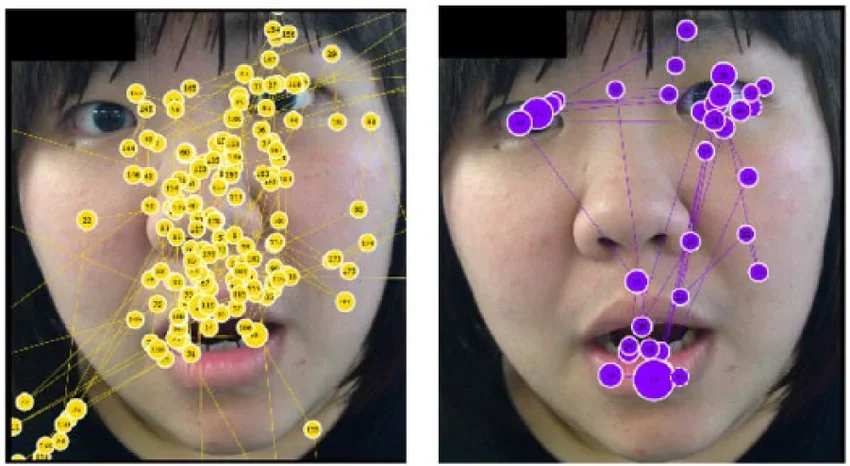
Left shows the eye tracking mapped for an individual with ASD (Autism Spectrum Disorder). Right a control group individual.
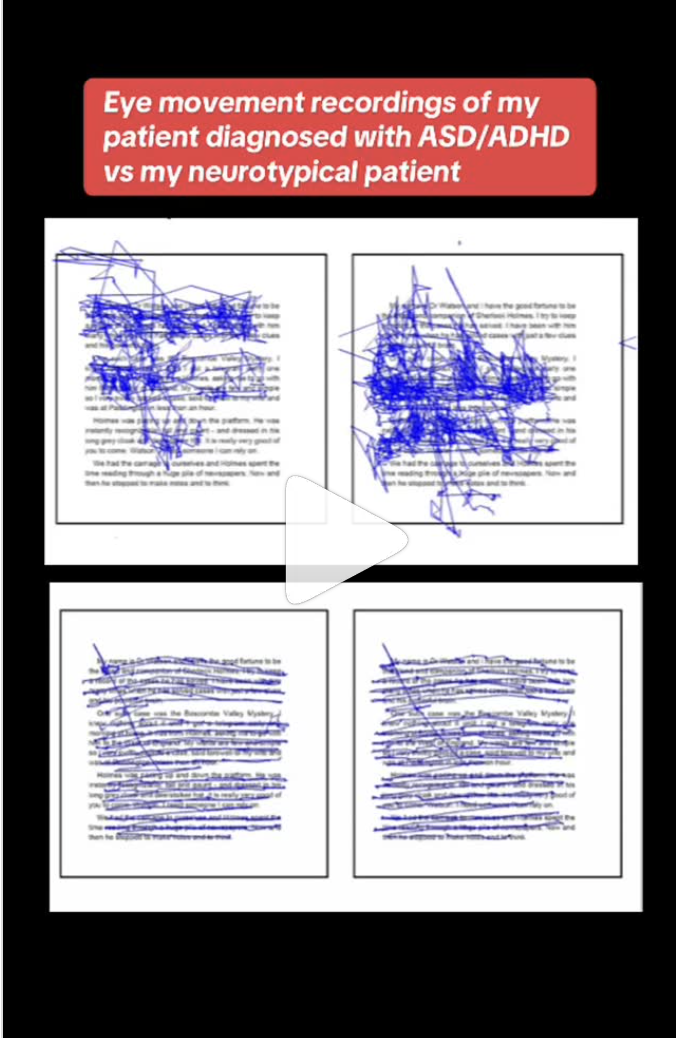
Another eye tracking map of note, that really informed my thinking in how different eyes move across a page was an image I saw on Instagram from an Optometrist (@vividvisionoptometry) which shows an eye tracking map of a patient with ASD/ADHD, and the other a neurotypical patient. The difference is stark (though not representative for every person with ASD/ADHD).
How can we take what we’ve learnt about Eye Tracking to improve accessibility in picture books?
When you imagine moving your eye across the page as an effort, it can really transform how you consider where elements on the page should go. I think it’s easy to see how important keeping page elements in a predictable place, so they can be accessed with minimal effort, reducing frustration and giving the reader more energy and time to engage with the text and images on the page. I am convinced that considering eye tracking will also aid somewhat with keeping the attention span of children on a book as well. The fewer barriers put up on the page to focus and flow the better.
Quick tips
1) Keep text and images in predictable positions on the page.
Text: top left or bottom left of the page. Left-aligned, on a straight line or predictable path-shape.
Images: directly below the text it supports.
2) Consider how the eye moves across the page, typically the eye moves in one of two ways (see image below), though this is not how the eye moves for those with SEND.
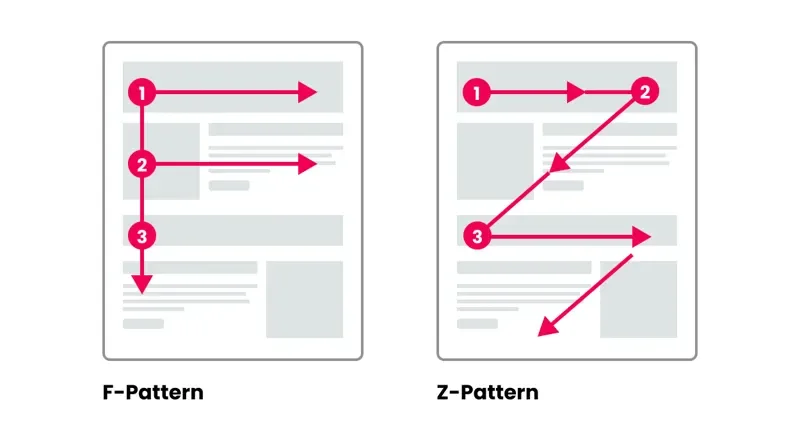
Image by Denise Baginski
3) Make sure there is ‘breathing’ space around all text and images, not only to reduce visual clutter, but to clearly indicate to the reader that they should move their eye and focus to a different part of the page. Breathing space gives an indicator to the reader of hierarchy of elements on the page. Keep spacing consistent and predictable.
4) Keep it simple! Fewer and clear elements help guide the eyes, help important text or images stand out and reduce cognitive load – which will reduce frustration and keep attention for longer.